Parametric modeling software products are not new in computer-aided design (CAD). Introduced in 1988 with the launch of PTC’s Pro/ENGINEER (since renamed PTC Creo), parametric modeling is still relevant and predominant in 2025, more than three decades later. From a practical point of view, this concept simplifies solid modeling and helps save a lot of valuable time. It also boasts reliability and superiority over other modeling technologies that have attempted to gain wide adoption in the CAD market. It’s no wonder that design professionals prefer it to other design methodologies. As a result, more and more CAD applications have introduced support for parametric modeling.
As originally designed, parametric modeling worked as follows: whenever a designer or engineer changed the value of a dimension or edited a particular section of the solid model, the shape of the model’s geometry would automatically update. To put it simply, the shape automatically changes when one or more parameters – such as dimensions – or the relationship between the various objects is altered. Generally, the parametric modeling functionality automated the design and revision process. Moreover, it made 3D modeling tools easily accessible with improved modeling tools, such as fillet, extrude, sketch, and so on, as part of their 3D/solid modeling projects.
Many years on, the above description holds. And as the CAD industry has evolved, CAD software companies have learned ways to improve the parametric modeling functionality within their applications. For example, this has led to the re-imagination of the workflows that professionals utilize when creating solid models. Overall, the existence of these improvements as well as the distinct implementation of the functionality from one application to another, mean that some software programs are better than others. For this reason, this article discusses the 5 best parametric modeling software products of 2025.
Table of Contents
Criteria for Evaluation
Anyone can come up with a list of the best parametric modeling applications, but for the sake of transparency and to give you an understanding of the rationale behind our selection, we believe it is important to explain the criteria we used to evaluate and rank the best parametric modeling software of 2025. These include:
1. Features and Capabilities
Users often consider 3D software’s features and capabilities the foremost factor whenever they want to subscribe to or purchase a particular program. We are no different. Our list considers the various features an application offers and, by extension, what it can enable users to achieve. We acknowledge that some developers include many features in their software. Sometimes, this factor can negatively impact the user experience, as we have detailed below.
2. Compatibility and Interoperability
A good 3D software application should be capable of opening and even editing files and models created using other software. This factor promotes collaboration with design professionals who prefer other applications.
3. Ease of Use and Learning Curve
The parametric modeling software product should not only be easy to use but also have a gradual learning curve. Combined, these attributes make the application ideal for both beginners and seasoned users. In some cases, however, developers include numerous features, which can negatively impact the ease of use. As a result, such software programs have numerous windows and commands, which may be difficult to locate.
4. Customer Support and Community Resources
The best parametric modeling software products have robust and active online forums. Here, users who encounter problems can send queries, with answers provided by either the developers’ representatives or other users. However, during our research, we found programs that did not have a vibrant online forum, forming part of the basis of their exclusion.
5. Pricing and Licensing Options
Some software applications are more expensive than others. At the same time, some developers offer their products based on a perpetual license, while others prefer the subscription route. As a result, our list encompasses a whole array of products, including those on the lower and higher end of the pricing spectrum. The inclusion stems from the fact that, though some applications may be expensive, they offer value for money because of their capabilities and features.
Top 5 Parametric Modeling Software of 2025
1. NX
NX is a high-performance design and manufacturing software developed and sold by Siemens Digital Industries Software. It is considered one of the most powerful CAD packages on the market, with many testimonials stating that it is the best and most advanced CAD solution. And that’s because it has advanced assembly management and industry-leading direct modeling capabilities. It also provides flexibility by offering different approaches to achieving a particular result. NX is a darling among large design companies and is used by Apple and Samsung.
NX has secured the top spot in G2’s MCAD software rankings, dubbed the Grid® Scoring, for several consecutive quarters, a position it still held as of the Winter 2025 season. As the leader, NX is highly rated by users and has a substantial market presence. Software must satisfy a number of conditions for them to qualify for inclusion in the category. One of these conditions, which touches on parametric modeling, is the software’s ability to assist engineers and designers in creating and modifying 2D drawings and 3D models.
NX has numerous powerful tools that enable 2D drafting, 3D modeling, sheet metal design, and surface modeling. If you’re looking for expanded capabilities, you can opt for either NX CAM or NX CAE, which are standalone software separate from NX CAD.
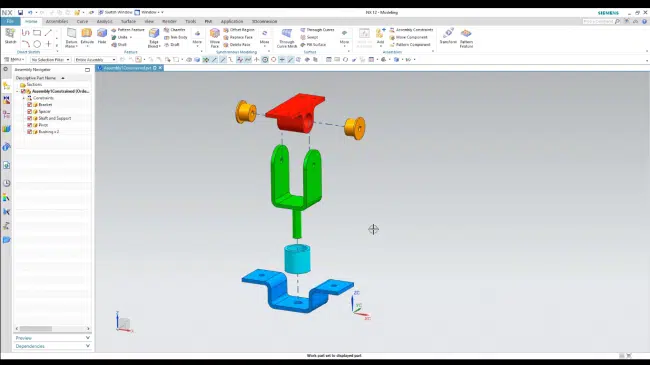
User Interface and Parts Assembly on Siemens NX
Features of NX
- Algorithmic modeling, which helps designers create minute, repetitive, and complex designs
- Translators, which translate files created by other CAD software like Creo, Catia, AutoCAD, Revit, and SolidWorks, as well as file formats like IGES, STEP, STL, OBJ, and ACIS, among others
- NX Open API toolkit allows developers to integrate custom software applications with NX
- Synchronous modeling, parametric modeling, sheet modeling, feature-based solid modeling, surface modeling, and aerodynamic modeling
- Integrated motion, structural, and thermal simulation tools
- Topology optimization to improve structural designs
- Molded part validation and injection molding simulation
- CFD analysis
- Built-in data management and cloud-based CAD capabilities with the NX X SaaS offering
- Teamcenter integration
NX Pricing
|
NX Package |
Pricing |
|
NX X Design Standard |
$7,371.00 per year |
|
NX X Design Advanced |
$9,576.00 per year |
|
NX X Design Premium |
$12,222.00 per year |
Pros of NX
- NX is very stable and well-optimized for parametric modeling, given that it has been in the market for over 40 years and has, therefore, been refined to a tee
- It handles large (1,000+) part assemblies quite well without any slowing down or crashing
- NX is one of the most used software in the professional industrial design world
- It seamlessly integrates with Teamcenter, Siemens’ product lifecycle management (PLM) software, enabling file version control, improved CAD security, and collaboration
- Active user community on Reddit and the official Siemens forum
- Elaborate support resources, such as helpful documentation for each NX version
- Siemens provides training via its Siemens Xcelerator Academy
- Highly accurate 3D modeling and handling capabilities
- Siemens updates NX constantly with new features
Cons of NX
- Steep learning curve
- NX is quite expensive
- Users complain that it has a clunky UI, which does not make the UX any better
- It generates large CAD files
- NX requires powerful hardware to run seamlessly
2. CATIA
Dassault Systèmes offers two versions of CATIA: 3DExperience CATIA and CATIA V5. The former version, whose latest release is the CATIA R2025X, allows users to enjoy the perks of the 3DExperience (3DX) platform either on-premise or in the cloud. 3DX is a collaborative platform that enables organizations to monitor their business activity and innovate.
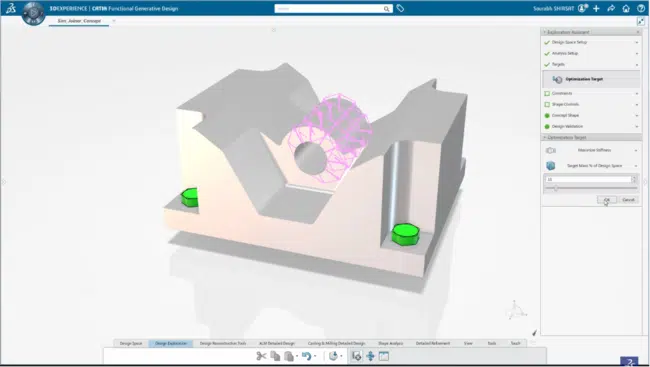
3DExperience CATIA User Interface (source)
On the other hand, CATIA V5, whose latest release is the CATIA V5-6R, is a software-based toolset designed to facilitate mechanical design, shape design and styling, analysis, machining, product design, equipment and systems engineering, and more. CATIA V5-6R can function without being linked to 3DX, but can provide access to the platform if desired, while CATIA R2025X requires 3DX to function.
CATIA is a powerful modeling tool that can offer cloud-based simulation and analysis, which enables designers to harness the power of cloud computing. In fact, even CATIA V5-6R, which is designed as desktop software, lets you access the 3DX platform, signifying Dassault Systèmes’ emphasis on using the cloud to complement its on-premise offerings.
Features of CATIA
The features and capabilities packed into CATIA include, but are not limited to:
- Analysis, including thermal analysis, structural analysis (part, assembly, and nonlinear), finite element analysis (FEA) for surfaces and solids, digital mockup (DMU) engineering analysis
- Mechanical design, including sheet metal design and production; tooling design; part and assembly design; composites design and engineering; mold tooling design; core and cavity design; wireframe and surface design
- Machining capabilities, including lathe machining, NC machine tool building, 3-axis surface machining, and more
- Shape design and styling
- Equipment and systems engineering, including circuit board design, HVAC design, and more
- Real-time rendering
- Simulation, including kinematic simulation, fitting simulation, NC machine tool simulation
- STL rapid prototyping
CATIA Pricing
|
CATIA Package |
Pricing |
|
CATIA |
$2,268.00 per quarter |
|
$7,560.00 per year |
Pros of CATIA
CATIA’s advantages include:
- Extensive materials library
- It eases the process of modeling complex geometries and shapes
- CATIA maintains a design history
- It facilitates the visualization of large assemblies, enabling users to identify issues during the modeling stage
- CATIA supports seamless collaboration via the 3DExperience platform
Cons of CATIA
CATIA’s disadvantages include:
- For CATIA to work efficiently, it must run on a powerful CAD workstation
- CATIA is expensive, costing $2,268.00 per quarter or $7,560.00 per year
- It is not easy to use, especially for beginners, with multiple users saying that the UI is complicate
- Dassault Systèmes does not provide a lot of information about the software on its website; to access this information, users must contact the company’s sales representatives
3. SolidWorks
It is available for download and installation as desktop software, primarily on the Windows platform. For a detailed guide on how to download, install, and set up the software, check out our article on SolidWorks basics. (Do note, however, that you can use SolidWorks online during the free trial. This allows you to run the software on Amazon servers.)

SolidWorks Online User Interface
We have included SolidWorks in this list for several reasons, chief among them the fact that it is feature-rich. Other reasons include the fact that it is relatively user-friendly for users with some CAD experience and is generally a very powerful parametric modeling and solid modeling solution.
Features of SolidWorks
SolidWorks’ features and capabilities include:
- Color picker from any interface/software
- 3D texture tool, which defines the textures of 3D models
- Direct mesh modeling
- Visualization tools
- Customizable mouse gestures
- Ability to manage references by locking, unlocking, and/or breaking individual references
- 3DExperience platform, which offers access to data management, collaboration, advanced simulation (e.g., injection molding simulation, electromagnetic simulations, robot simulation, factory simulation, and more), analysis (e.g., fluid flow and thermal performance analysis), manufacturing, and production tools
SolidWorks Pricing
|
SolidWorks Package |
Pricing |
|
SolidWorks Standard |
$2,820.00 per year |
|
SolidWorks Professional |
$3,456.00 per year |
|
SolidWorks Premium |
$4,716.00 per year |
Pros of SolidWorks
SolidWorks’ advantages include:
- It is user-friendly and easy to learn and use
- It offers an extensive suite of modeling and simulation tools
- There is a vast pool of online resources, and customer support is readily available via the SolidWorks forum
- The 3DExperience promotes collaboration and streamlined communication
- SolidWorks supports plenty of add-on tools that enable processes such as tolerance analysis
- It simplifies the design of complex geometries and assemblies
Cons of SolidWorks
SolidWorks’ disadvantages include:
- SolidWorks is quite expensive, especially considering that Dassault Systèmes offers various packages separately. Each SolidWorks package has its own pricing
- There are limited free SolidWorks options, namely only the free trial
- It does not have a free package for students
- A powerful CAD workstation is necessary for you to fully enjoy SolidWorks
- Large assemblies can take a while to open
4. Autodesk Inventor
Autodesk Inventor is a 3D CAD software designed to help design professionals undertake mechanical design. It also offers product simulation tools and documentation. Additionally, Inventor enables users to share feedback using built-in collaboration tools and work with BIM software such as Revit, thanks to built-in interoperability. Users also say it offers a logical approach to parts and assembly design. It also facilitates product data management through Autodesk Vault, software that can be easily integrated into Inventor.
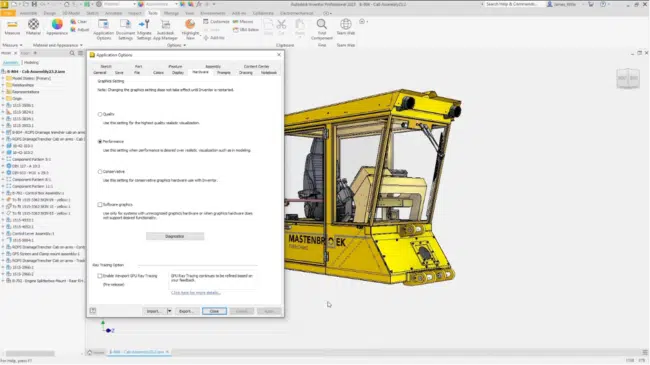
Autodesk Inventor User Interface (source)
We have selected Autodesk Inventor because it is pocket-friendly – its subscription prices are not as high as PTC Creo or SolidWorks. Additionally, users can purchase it as part of Autodesk’s product design and manufacturing software bundle, including Inventor, AutoCAD, Fusion 360, and Navisworks Manage. This allows you to enjoy a potential annual savings of more than $4,000. At the same time, Inventor has a vibrant online community, meaning users can easily receive quality answers to their questions.
Features of Inventor
The features and capabilities of Autodesk Inventor are as follows:
- Assembly modeling
- Parametric, freeform, direct, and rules-based modeling
- 2D design
- Sheet metal design and preparation
- Automated frame design
- Interoperability with Revit
- It can open 3D models created and saved using other CAD applications
- It can also accurately translate files from virtually any CAD software in use today (translation is the process of converting imported non-native data from other software to native or neutral data)
- An extensive standard and customizable content library that includes beams, bolted connections, gears, cams, nuts, bolts, and fasteners, just to name a few. In total, you can generate over 750,000 standard components from the library
- Support for simulation and visualization, including dynamic simulation, stress analysis, and exploded views and animations
Inventor Pricing
|
Inventor Package |
Pricing |
|
Inventor |
$310 per month |
|
$2,500 per year |
|
|
$7,505 per 3-year term |
Pros of Inventor
Autodesk Inventor’s advantages include:
- Like all other Autodesk products, Inventor has an active community – the Inventor Forum – that allows users to share their knowledge, ask questions, and explore topics and questions asked by other users
- It supports the automation of repetitive tasks using iLogic
- Inventor promotes standardization of procedures using iLogic, thus reducing errors
- Its cloud-based design review function enables users to collect feedback from clients and other stakeholders regardless of their location
- Inventor is available for free to students and educators
- Its prices are friendly
Cons of Inventor
Autodesk Inventor’s disadvantages include:
- It has fewer commands and features than SolidWorks, CATIA, and Creo
- Inventor is only available on Windows
5. PTC Creo
When Pro/ENGINEER was unveiled in 1988, PTC Inc., its developer, became the first to market with associative feature-based parametric modeling software. The launch ushered in an era of simplified solid modeling, revolutionizing the CAD industry as it was known then. So revolutionary was parametric modeling that it is still in use over three decades later. And though Pro/ENGINEER was renamed to PTC Creo in 2010, its status as the pioneer of that design methodology remains.

PTC Creo User Interface (source)
We rank PTC Creo fifth on this list of the top 5 best parametric modeling software for two main reasons. The first is PTC Creo pricing: the software is quite expensive. The second reason is the ease of use: users, even the most experienced ones, report that it is not easy to learn or use. Still, the software offers a number of features and functionalities that have made it a leader in the solid modeling space.
Features of PTC Creo
PTC Creo offers the following features:
- AI-driven generative design – generates best designs as boundary representation (BREP) geometry for different manufacturing processes. The designs are based on user-defined engineering requirements. It also enables the comparison of multiple design variations, materials, and manufacturing processes based on the designs generated.
- Additive manufacturing: It supports 3D printing
- Associative workflow: any changes made to the design will be reflected throughout the workflow
- Support for machining operations, including NC sheet metal, milling and turning, machining, wire electrode discharge machining (EDM)
- Augmented reality rendering
- Support for processes at every stage of manufacturing, including mold design for injection molding, tooling for injection molding parts, 3D simulation, and more
- Support for a variety of extensions and modules
- Compatibility with files and models created using CATIA, IGES, Inventor, NX, Solidworks, and SolidEdge
PTC Creo Pricing
|
PTC Creo Package |
Pricing |
|
|
Fixed/Locked License |
Floating License |
|
|
PTC Creo Design Essentials |
$3,040.00 per year |
$3,720.00 per year |
|
PTC Creo Design Advanced |
$8,880.00 per year |
$10,900.00 per year |
|
PTC Creo Design Advanced Plus |
N/A |
$15,400 per year |
|
PTC Creo Design Premium |
N/A |
$21,300 per year |
|
PTC Creo Design Premium Plus |
N/A |
$29,400 per year |
Pros of PTC Creo
PTC Creo offers the following advantages:
- It offers a wide range of tools and functionalities, including mold design, superb surface modeling, die design, wire and spool harness creation and customization (using the Cabling module), and more
- PTC Creo takes constraints automatically
- It has an extensive library of pre-defined components
- It can generate designs that have disparate properties; it further supports the comparison of these designs
Cons of PTC Creo
PTC Creo is disadvantageous in the following ways:
- Limits most of its features to expensive tiers
- Steep learning curve due to complexity and the existence of numerous tools
- Less effective or inferior rendering tools and outcomes compared to CATIA and SolidWorks
- It is costly
- It is not cloud-based, meaning the files can only be saved locally
Honorable Mentions
1. FreeCAD
Of course, the top 5 best parametric modeling software products discussed above offer a free tier – either through the free trial or via dedicated packages intended for students, educators, or qualifying parties. Unfortunately, however, they are not free over a user’s lifetime. So if you have been searching for a perpetually free 3D modeling software that supports parametric modeling, look no further than FreeCAD.
Features of FreeCAD
- Support for a variety of file formats, including STL, DWG, STEP, IGES, DAE, DXF, SVG, IFC, OFF, OpenSCAD, SHP, CSG, and more
- Additive manufacturing: it enables users to undertake 3D printing, CAM, and CNC
- Workbenches: FreeCAD groups all related tools within an environment known as a workbench that is intended to achieve a given task. There are several dedicated workbenches, including 2D CAD drafting, Finite Element Analysis, design of industrial robot trajectories, architectural and BIM modeling, and more
Pros of FreeCAD
- It is available on Linux, Windows, and macOS platforms
- FreeCAD supports scripting and customization
Cons of FreeCAD
- Users report slow performance
- It does not receive yearly updates as is the case with other 3D modeling software
- FreeCAD does not have some features that are available on other 3D modeling software
2. Onshape
Onshape is a relatively new 3D modeling software that is primarily cloud-based. This means it is not available as desktop software. Instead, to use it, users access the Onshape servers via a web browser. In this regard, Onshape uses a software-as-a-service (SaaS) business model, which sets it apart from other players in the 3D modeling space.
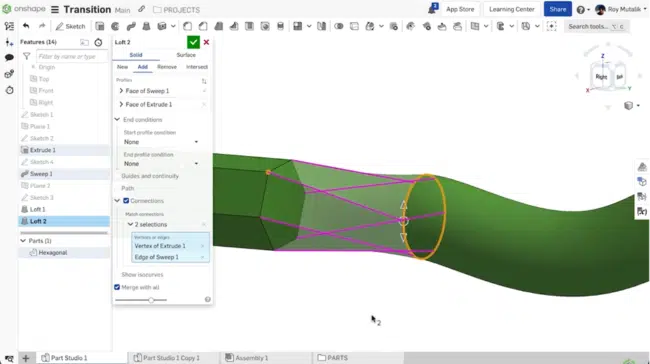
Onshape User Interface (source)
And though relatively new compared to the other software in this list of the 5 best parametric modeling software products, having been released in 2012, Onshape has a number of features that make it stand out. Additionally, it was acquired by PTC in 2019, with the acquisition adding PTC’s experience and expertise in parametric modeling and solid modeling. Following the acquisition, Onshape operates as a SaaS business unit within PTC.
Since its release in 2012, the developers of Onshape have introduced numerous features that improve upon its capabilities. In 2018, the company introduced Parametric Modeling 2.0, which sought to streamline and simplify each parametric modeling workflow used by design professionals. The revamp led to the introduction of changes to various areas within the parametric modeling ecosystem, including multi-part design, in-context design, sheet metal tools, and custom features. It also introduced configurations and standard content.
Features of Onshape
Onshape’s features include, but are not limited to:
- Configurations enable users to create multiple variations of the same model, each with different parameters
- Built-in library of standard content such as bolts, nuts, screws, and washers
- It allows design professionals to design all related parts within a single space, with all these parts having a single parametric history – thus, when one parameter is changed, Onshape updates all the parts accordingly
- Superior sheet metal design tools, including the ability to simultaneously see a folded, flat, and table view of a sheet metal part
- Automation and customization through FeatureScript, an open-source programming language
- Built-in Product Data Management (PDM), a set of tools that enables users to manage and control design data within a 3D CAD environment
- It supports visualization through simulation and rendering
- A cloud-native approach to finite element analysis (FEA)
- History and version tree, which enables users to compare, revert to, or branch from any point in the history of their model or document
Onshape Pricing
|
Onshape Package |
Pricing |
|
Onshape Free |
$0.00 |
|
Onshape Standard |
$1,500 per year |
|
Onshape Professional |
$2,500 per year |
Pros of Onshape
The advantages of using Onshape are:
- It promotes collaboration as multiple users can contribute to the model or edit the Onshape documents simultaneously
- Onshape provides real-time data management because it is primarily based on the cloud
- Its full-cloud architecture compensates for less advanced local systems
- It can be accessed via a smartphone
- Onshape offers data security thanks to a database-driven architecture that eliminates unauthorized duplication, accidental sharing, and data breaches
- Onshape is available for free to students and educators, qualifying startups and entrepreneurs, and hobbyists
Cons of Onshape
The disadvantages of Onshape include:
- It requires a fast internet connection
- Onshape does not have some of the features found in more mature CAD software such as SolidWorks, CATIA, and PTC Creo
- Some of the tools, such as simulation, are still at the basic stage and are, therefore, not as advanced as those found in SolidWorks, CATIA, and PTC Creo
Other 3D CAD software applications that deserve a mention include Rhino 3D, Solid Edge, Fusion 360, and Bentley MicroStation. Consider checking some of the articles in which we have compared the above software programs: Onshape vs. SolidWorks, CATIA vs. SolidWorks, Creo vs. SolidWorks, and SolidWorks vs. Autodesk Inventor.
Conclusion
The 3D CAD software space is evolving fast, with developers creating applications with advanced capabilities. As a result, choosing the right software that meets your needs can be cumbersome. For this reason, we have prepared a list of the top 5 best parametric modeling software products for 2025. The list includes SolidWorks, CATIA, Onshape, PTC Creo, and Autodesk Inventor. Each of these solutions caters to different price points. Additionally, some, like Onshape and 3DExperience CATIA, are primarily cloud-based, while others offer access to the cloud via built-in web apps. Here’s a summary:
- Most expensive parametric modeling software product: PTC Creo
- Most affordable parametric modeling software product: Inventor
- Best parametric modeling software for mechanical design: Autodesk Inventor
- Best parametric modeling software for aerospace and automotive engineering: CATIA
- Best parametric modeling software for product design: NX
- Best parametric modeling software for manufacturing and milling: SolidWorks
- Best overall parametric modeling software overall: NX
We would like to point out that this article is meant to act as a guide. In that regard, we recommend that you carry out extensive research and experiment before choosing a particular parametric modeling software product.