We have previously discussed the benefits of choosing ArchiCAD for your primary CAD software. With ArchiCAD’s BIM capabilities it is certainly a strong competitor in the CAD software landscape.
However, pricing is an important factor in selecting the best CAD solution and the reality is that the pricing systems for CAD software can often become complex. The pricing structure for ArchiCAD is a case in point. This should not discourage you from considering the program, however. In this article, we’ll tell you everything you need to know about the pricing system of ArchiCAD.
Table of Contents
ArchiCAD License Options
ArchiCAD is available with the following license options:
- Commercial ArchiCAD license
- Cloud-based ArchiCAD subscription license
- Educational ArchiCAD license
- Free trial ArchiCAD license
- Demo license
- Rental license
Graphisoft has regionalized the prices of its products. As such, the prices depend on your locality and local currency. These prices are also not the same across the board (even after converting to USD); it is less in some countries and more in others.
Commercial ArchiCAD License
The commercial ArchiCAD license is a key-based license. There are two types of commercial licenses:
- Full license
- Rental license
Full License
The full license allows you to use the fully functional ArchiCAD software in perpetuity without any limitations to how you use the software in its existing form. However, you cannot upgrade the ArchiCAD version you purchased to a newer version unless you purchase the Graphisoft Software Services Agreement (SSA) and Graphisoft Forward (FWD) licenses. Essentially, the full license represents the old ArchiCAD pricing model at Graphisoft, i.e., the perpetual licensing model that the company is phasing out. More on this below.
The full license offers access to the desktop-only version of ArchiCAD, which has all the features and runs locally on your computer. It also gives you access to Teamwork, enabling you and your colleagues to share workflows. Additionally, customers can use the SSA and FWD contracts to upgrade their ArchiCAD software annually. Like the perpetual licenses, the SSA and FWD contracts will be phased out.
Rental License
The rental license lets you buy and use the ArchiCAD product for a specific period. You can select a 1-month, 3-month, 6-month, or 12-month term. With this rental option, you can use the fully functional ArchiCAD software without limitation. However, it is only available in select markets.
Cloud Subscription License
The cloud subscription license is available on a one-month, one-year, or three-year term. There are two types of cloud licenses:
- Named license: this cloud license is connected to your Graphisoft ID, meaning it only works if you are signed in.
- Floating license: this cloud license is not attached to a specific user. Rather, it is assigned to a group and can be used on demand by any member of this group without being assigned to a particular user through their ID.
The cloud subscription license enables you choose between the Collaborate and the Solo offerings, each giving you unlimited usage. The ArchiCAD Collaborate offering gives you access to the ArchiCAD software as well as the BIMcloud and BIMx Pro software. On the other hand, the ArchiCAD Solo offering only gives access to the ArchiCAD BIM software; it does not come with BIMx or BIMcloud capabilities.
For context, the ArchiCAD BIM software lets you use its powerful design and modeling tools to ideate, design, and deliver projects. BIMx is a presentation and coordination app available on desktops and mobile phones or online via a web browser. Lastly, BIMcloud is a software-as-a-service (SaaS) solution that enables architects, clients, contractors, and other project stakeholders to access project models anywhere, anytime, and on any device; it enables real-time collaboration on both large and small projects. BIMcloud replaced the Graphisoft’s Teamwork product.
Free Trial ArchiCAD License
This is a free 30-day version of ArchiCAD that can be used to check if you’d actually like to purchase a license. This is a great option for those who wish to fully evaluate the software prior to any financial commitments.
You can request the ArchiCAD free trial on the ArchiCAD Trial Download page. In order to gain access to the free trial you will be required to create a ‘Graphisoft ID’ which is simply an online account for your ArchiCAD license. You will also need to define whether you are using ArchiCAD for professional or educational purposes.
Some software developers will heavily restrict a free version of their software to encourage users to purchase a license. In the case of ArchiCAD, its free trial limitations are related to how freely you can use the files created by ArchiCAD. Their website states that you can only open the files created by the trial software on the same machine they were created. Therefore sharing files, created by the free ArchiCAD version, with your colleagues would not be possible.
These limitations notwithstanding, the free trial gives you full access to ArchiCAD Collaborate for 30 days. This means you get to use not only the ArchiCAD software but also BIMcloud and BIMx Pro. With this license, you enjoy the software’s full modeling capabilities. Plus, the software does not add watermarks to the projects and documents you generate. You can also choose either a one-seat or multi-seat trial.
Demo License
The Demo license is more of a mode than a license. Usually, ArchiCAD launches in this mode if you start the program once your 30-day trial has elapsed or if you do not have a valid license (software key). You cannot use the save or copy functions in this mode, but you can print documents.
Educational ArchiCAD License (EDU)
ArchiCAD is available for free to students and educators via the EDU license. This license grants access to a fully functional version of the software. You can renew it every year of your academic life, but you cannot use it once you leave academia.
It also has other limitations. For instance, an irremovable watermark is added at the top right corner and is present on documents that you print out. Also, you cannot exchange data using the copy, paste, merge, or hotlink functions between the educational ArchiCAD and commercial ArchiCAD.
To use ArchiCAD for educational purposes, Graphisoft advises you to first download the 30-day free trial and then request a license via the MyArchiCAD website.
For a detailed explanation of these license types, check out the related Help Center article.
ArchiCAD Perpetual License
Most software developers are moving from a perpetual license model to subscription-based pricing. The benefit of subscription pricing is that of simplification; in the past, if you purchased a perpetual license you were usually required to pay for support, upgrades and any other related services.
With subscription pricing you know that there are no hidden costs beyond the monthly or annual subscription fee. Additionally, you have the peace of mind that your software is always up-to-date and you continue to have access to support.
It comes as no surprise then that Graphisoft, the developer of ArchiCAD, cited these advantages as some of the reasons it is moving away from the perpetual licensing model. The company announced in early 2024 that it would phase out perpetual licenses by the end of 2025 in favor of what it called a “future-proof subscription model.”
The company made perpetual licenses available to new customers until December 31, 2024. This means that from January 2025 onwards, new customers couldn’t purchase perpetual licenses to the ArchiCAD software. Meanwhile, according to the announcement, existing customers would enjoy this perk until December 31, 2025. ArchiCAD perpetual licenses would, therefore, cease to exist from 2026 onwards.
What about License Management?
Managing a license in a corporate environment can be an important factor in your purchase decision. If you have multiple potential users of your ArchiCAD license you will want to ensure that you select a licensing method which allows for such flexibility.
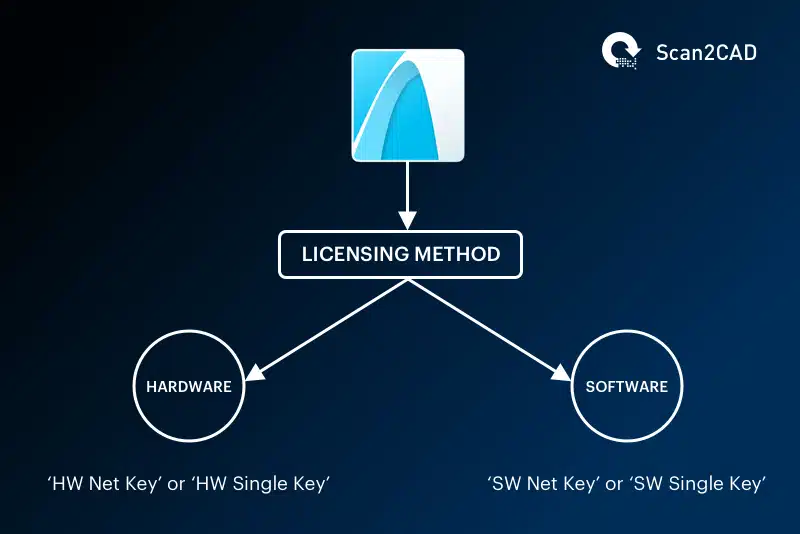
ArchiCAD licensing is available in two formats:
1. A Hardware key
The hardware (HW) key comes in two forms; the Hardware NET or network key (see the network license section below) and the Single Key. The HW NET key contains the network license, while the HW single key contains the single license.
The Single Key is the common hardware license you may have encountered from other software vendors. This licenses a USB dongle and you can run on any PC which has the dongle inserted. Luckily these dongles are cross-platform meaning they will run on both MacOS and Windows systems.
2. A Software key
Much like the hardware key, the software key is available as a ‘single’ or ‘network’ option. The software key is a file that is downloaded onto the computer on which the software is to be installed. These keys may be used for managing single or multiple licenses. The software single key contains and enables you to use the single license, while the software NET key contains and enables you to use the network license.
The license can be downloaded from the License Manager Tool (LMT) software that is installed automatically with ArchiCAD and can itself be downloaded from the Graphisoft website.
Network vs Single License Option
A single key holds one license, with each workstation, therefore, needing its own individual key. A single license lets you use only one ArchiCAD product on just one workstation. It cannot be shared.
But many companies have multiple users of CAD software and prefer to manage the licenses across a LAN. You will have a computer acting as the server for your licenses and all other users on your LAN will be able to access the software license. In such an instance, a network license lets you share multiple licenses across multiple workstations connected to a CodeMeter server. Under this arrangement, licenses are allocated only when needed, which is not the case with single licenses.
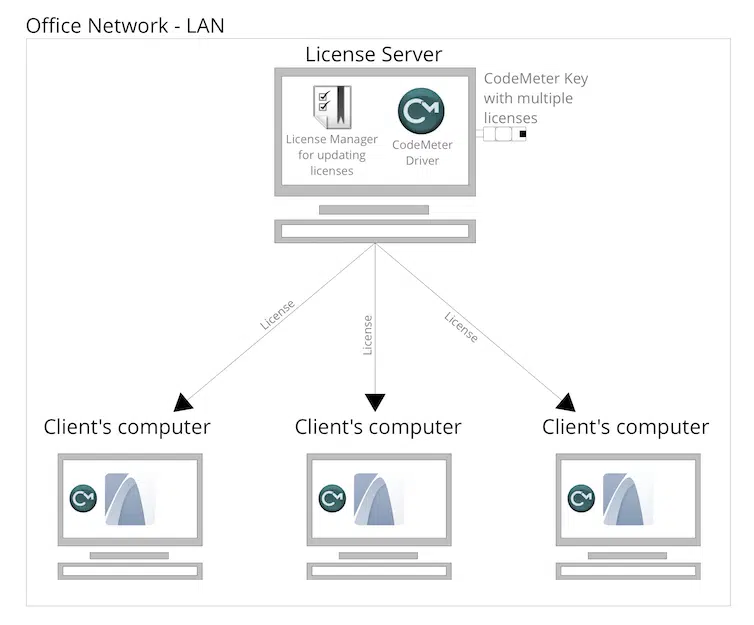
Diagram demonstrating ArchiCAD’s hardware network licensing method. (Source)
Still, under license management, you can also use Graphisoft’s license borrowing feature to ‘lend’ your network key. This feature allows individual users to ‘borrow’ the network license key temporarily whenever they want to go offsite and won’t be connected to the server.
ArchiCAD Pricing – The Full Breakdown

With Graphisoft retiring the perpetual licensing model in stages, new customers can only access the cloud subscription licenses. It is for this reason that this ArchiCAD pricing section only captures the cost of these subscription licenses. We couldn’t independently get ahold of the prices of the perpetual licenses. Plus, we believe that existing customers, for whom the perpetual licenses are still available, are already privy to how much they’d pay or have a way of getting this information directly from Graphisoft.
Here’s a breakdown of the subscription cost based on the new ArchiCAD pricing model. The prices are exclusive of any applicable taxes and have been sourced from Graphisoft’s online store.
|
ArchiCAD Product |
Price per seat |
|||||
|
1-Month Term |
1-Year Term |
3-Year Term |
||||
|
USD |
GBP |
USD |
GBP |
USD |
GBP |
|
|
ArchiCAD Collaborate |
$400.00 |
£320.0 |
$2,810.00 |
£2,250.00 |
$7,587.00 |
£6,075.00 |
|
ArchiCAD Solo |
$360.00 |
£220.0 |
$2,500.00 |
£1,530.00 |
N/A |
N/A |
Where Can I Purchase ArchiCAD
We recommend that you purchase your ArchiCAD license from a local reseller. You will have the benefit of being billed in your local currency and some services may differ depending on your location, therefore, purchasing from an international reseller may not be the best option.
Only purchase from a verified ArchiCAD reseller. It may be tempting to purchase from a cheaper, unofficial source but you are most likely purchasing cracked software which is both illegal and counterproductive if you depend on the software for your professional work.
How do you know if a reseller is verified? You should be able to find them listed on ArchiCAD’s website. To find your local ArchiCAD resellers, you can use ArchiCAD’s default sales agent finder.
You could also purchase your license directly from Graphisoft via their online store. The store automatically detects the country from which you’re logging in and allows you to choose another country. As mentioned earlier, it also bills in that country’s local currency, although this capability isn’t universally available for all. For instance, it’d still bill you in USD if you are logged on from Kenya.
Are There Alternatives to ArchiCAD?
Yes, we compiled a list of the most popular free CAD software, the 10 best 3D CAD software, the best CAD software for collaborative design, and the best architectural CAD software choices. Most solutions will offer a free trial with which you can evaluate the best solution for your needs. Therefore we would recommend checking out the ArchiCAD trial download.
We’ve also made direct comparisons between ArchiCAD and competitors:
- ArchiCAD vs. AutoCAD: CAD Software Compared
- ArchiCAD vs. Revit: CAD Software Compared
- Vectorworks vs ArchiCAD: CAD Software Compared
- Top 5 ArchiCAD Alternatives
Graphisoft’s ArchiCAD is the industry’s first BIM software and a leading architecture software. Its automatic generation of drawings allows users to extract standard files like sections, elevations, and other 2D and 3D views. Because of its versatility and customization to your needs, ArchiCAD is a favorite among many.
Although this falls on the medium-high range of prices among other software, it doesn’t have as steep a learning curve as some high-end CAD software.
If you’re unsure how ArchiCAD’s pricing stacks up to other leading CAD solutions; you can check out our posts on AutoCAD pricing and Solidworks pricing for a full run-down.