Earlier, in Scan2CAD’s comprehensive guide on navigating the world of CAD standards, we mentioned that there are thousands of standards. These standards are grouped into two categories: those authored and approved on a regional or international basis, such as ISO standards, American National Standards, and European Standards, and those developed by individual organizations. In this follow-up article, we discuss the latter. Specifically, we focus on the step-by-step process of creating a CAD standards manual for your organization; what to include in this manual; updating an existing manual; and enforcing the rules contained therein. Let’s get started.
Table of Contents
Why Your Team Needs a CAD Standards Manual
Your team can enjoy the following benefits of the CAD standards manual:
- Consistency across projects: CAD standards ensure that designers and other team members use and follow the same design and naming conventions.
- Efficiency and productivity: As we detail later, a collection of detailed drawings that can be duplicated, i.e., detail libraries, boosts productivity by ensuring that designers have reference materials they can duplicate. Additionally, templates eliminate the initial file setup procedures, such as setting units, scale, and more.
- Better collaboration: Uniform CAD rules ensure that everyone stays on the same page. As a result, they can share files internally, with team members free to work on the drawings without the risk that they may introduce information that, if not aligned with the CAD standards manual, can lead to rework and disrupted workflows.
- Brand or company identity: When followed to the letter and for a prolonged period, a CAD standards manual provides an identity that lets people recognize, by looking at drawings, that they are from a particular company.
What to Include in a CAD Standards Manual
1. File Organization and Management Standard
CAD file organization and management are key to preventing file loss, unnecessary duplication, unauthorized access, or unintended editing. This makes it a worthy mainstay of both small- and large-scale CAD projects.
However, designers and engineers often default to their preferred methods of organizing and managing files, which differ from one person to the next. This may not be an issue for a CAD hobbyist who is inclined to stick to their method. But if these professionals are part of a company, then the different preferences can easily prevent collaboration and lead to misalignments that in turn cause delays and cost overruns.
To prevent such negative outcomes, a CAD file organization and management standard should feature prominently in the CAD standards manual. It should capture details such as how and where CAD files should be stored, naming conventions, folder structure and hierarchy, access control, tools for backing up the files, and more.
2. File Naming Convention and Drawing Numbering System
Large CAD files can take a considerable amount of time to load and possibly render before all the details appear on your CAD monitor. Naturally, this means that mistakenly clicking on the wrong file can prove costly from a temporal perspective.
Such a mistake could arise from an unclear file name or an incorrect drawing/sheet numbering system. Fortunately, dealing with this issue is simple: create a file naming convention and a drawing numbering system and document them in the CAD standards manual.
3. Version Control Standard
CAD file version control involves managing and tracking all the edits made to a CAD file since its creation. It offers numerous benefits, including aiding collaboration, promoting ideation, and helping designers revert to older versions of a file.
Version control can take many disparate forms that, if implemented in an organization, can create chaos and impede collaboration. As such, the CAD standards manual should include conventions that stipulate the agreed-upon best practices for naming files, assigning version numbers, and using revision control tables, as well as the version control system.
4. Layering Standard
Layers help you organize geometric and non-geometric objects in your drawing. In fact, they can help you hide certain information, reducing clutter and visual complexity of the drawing. Given their utility, many CAD software products let you set up and manage layers.
But these software applications do not follow a universal way of doing so. This means that teams can come up with and use varied layering approaches. This fact gives rise to non-uniformity and inconsistency, especially if the teams work within the same organization.
It is for this reason that the CAD standard manual should include layering conventions. The standard can establish rules for color, naming scheme, layer visibility, and layer management for printing.
5. Text and Annotation Standard
CAD drawings often feature text and annotations, which provide additional details about the drawings or objects within them. For this reason, a text and annotation standard that details the appropriate font/text style, font size/height, font color, text alignment, and fill color is necessary. Such a standard makes the drawing easy on the eye.
6. Standard on External Reference Files
External reference files (Xrefs) are documents or drawing files that you attach to or overlay in your current drawing. The CAD standards manual should include provisions that detail how designers should insert such files as well as how they should handle Xref paths.
7. Block Standard
The block standard includes rules for how designers should handle block entities. For instance, these rules could detail the layers on which the block must be created. The standard also touches on the title block, which is often handled separately from other blocks in the drawing.
The blocks standard must, therefore, outline what information to include in the title block; the standard can stipulate conventions on the format and location of the drawing title (including all the information therein), the drawing number, the sheet number, and so on) as well as the title block’s format.
8. Rules on Dimension, Scale and Units
The CAD standards manual should stipulate the acceptable dimension settings, unit format and precision, and scale. For instance, it can state that all CAD drawings shall be drafted in architectural units at a full scale of 1 drawing unit equals 1 millimeter.
9. Plotting Standard
The page setup dialog box in various CAD software allows you to choose from a range of paper sizes. You also have to stipulate aspects such as the plot area, plot offset, and plot scale. The plotting settings create an unlimited number of configurations, which, if implemented individually, would negate the tenet of consistency. In this regard, the CAD standards manual should include rules on what to select.
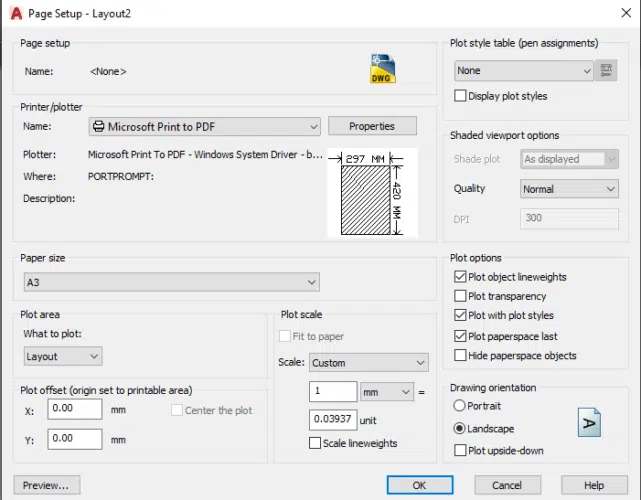
Page Setup Dialog Box in AutoCAD
Creating the Manual Step by Step
This step-by-step guide assumes that you or your organization has already selected a facilitator or coordinator who will oversee the process of creating the manual. In some organizations, this responsibility is assigned to the CAD manager, drafting manager, CAD coordinator, CAD leader, or someone whose title is a variation or combination of these.
If a person with such a responsibility does not exist, perhaps because your organization is still relatively small, then it is a good idea to hire someone for this role or assign this responsibility to an existing employee. At the same time, it can be tempting to set up a committee to oversee the development of the CAD standards manual. Noble though this idea may be, it is often a source of inefficiencies as some parties may not fully contribute. So, having a facilitator is your best bet. With that out of the way, let’s now focus on the steps to follow when creating the manual.
1. Consult Widely
No CAD facilitator works in a vacuum. They must consult widely with management, CAD drafters, engineers, and all users of CAD software. This level of consultation helps them establish whether there is an existing standard, an assumed standard, or no standard at all.
If a standard already exists, the next step is updating it. An assumed standard tells of a situation where the organization has a preferred way of doing things that has not been documented in writing. If this is the case, it is prudent to collaborate with designers and CAD leaders to identify these preferred methods and document or refine them. If your consultations reveal that no standard exists, move on to the next step.
2. Identify Pain Points
In addition to helping you confirm the existence, or lack thereof, of a standard, consultations also enable you to identify the pain points of the CAD design process. It allows you to meet all team members and learn what works and what does not. The pain points help you identify the areas that require the most attention.
But at this stage, the pain points are often broad, so it’s important to dig deeper. You should research each pain point and examine the possible causes in order to single out the greatest pain point, i.e., the main cause of a collection of pain points.
Consider the following scenario: you have plotted a drawing but observed that some lines are fainter than others. While an initial explanation might point to different line weights, further investigation may reveal that this issue is caused by using different colors for the objects. The line weight and different colors may be considered pain points. But they are not the main pain point.
If you analyze it even further, you may find that the issue is related to layer management – you may have placed the objects in an inappropriate layer, which is the primary source of the problem. Identifying several key pain points helps shape the focus of your CAD standards. It also enables you to create a CAD standards manual that has a significant impact. It provides a list you can use to formulate the standards. But it is worth pointing out that attempting to identify all main pain points may not be feasible as the possibilities are potentially limitless.
3. Document the CAD Standards
There are several ways to document the CAD standards:
- Written best practices
- Drawing templates
- Standardized detail library
The documented best practices outline all the requirements for CAD professionals. And to emphasize the requirements, you could also include reference drawings in this section of the CAD standards manual. These drawings guide designers on how they should implement the various sections of the manual.
Secondly, drawing templates are CAD files that store all the preferred settings. They capture details such as the preferred font, font size, annotation style, layer standards, line types and weights, block details, plot configurations, and more. Users select the template when opening a new CAD file, with the template then automatically ‘contributing’ the settings to the new file.
The third is a standardized detail library. This is a collection of detailed and standard drawings of parts, objects, and assemblies. For instance, if a structural engineering company has a detail of a retaining wall, this detail will be duplicated every time such a drawing is needed. Now, imagine the benefits if the company has more than 10 offices in different cities or states and a collection of multiple detailed drawings. This clearly shows how such a library promotes standardization.
Implementing and Enforcing CAD Standards
Share CAD Standards Manual
The CAD standards manual is useless if archived immediately after it is created and approved by management. The manual is only effective if everyone in the organization gets to read and understand its contents. The first step in enforcing CAD standards is to share the manual and ensure everyone reads it. You should also share the manual with new hires.
Review Drawings
The period that follows the introduction of new CAD standards is expectedly bumpy as some follow the requirements and others struggle to conform. For this reason, the CAD coordinator can review all the drawings and include comments to ensure conformity.
Mandate Use of Template Files
Mandating the use of template files ensures that all new drawings acquire the standardized settings from the outset. For easy access, use a file structure that stores the template in a readily accessible location.
Conduct Training
Training is a proven way of letting everyone in on new practices, including new CAD standards. It ensures everyone is on the same page. You can conduct the training after introducing new CAD standards, every time you update the existing standards, or when onboarding a new employee.
Use CAD Standards Checking Tools
There are tools that automate some of the provisions of the CAD standards manual. For instance, you can use systems that handle version control and file management. You can also use built-in or third-party tools like AutoCAD Standards Checker and SolidWorks Design Checker
Maintaining and Updating Your Standards Manual
Creating and implementing a CAD standards manual is just the beginning, especially considering that old practices and technologies evolve and new ones emerge. It is good practice to capture these changes in your CAD standards, which brings us to the need to update the standards manual. Here, there are two main ways to ensure your manual is up to date.
Conduct Regular Roundtables Discussions
Peers and stakeholders are as vital during the maintenance phase as they were during the development phase. For this reason, CAD coordinators should conduct roundtable discussions with these CAD professionals to identify what works and what doesn’t. Such discussions help them do away with provisions that add no value or prevent designers and drafters from being productive.
Constantly Review Standards
CAD designers should constantly review their standards to examine their relevance as technology and practices evolve or as the scale of the projects grows. The reviews help them come up with new standards that reflect the evolution, ensuring their company remains competitive and the workforce productive.
Borrow From Client’s CAD Standards (When Mandated)
Some clients require architectural and engineering companies to use the clients’ respective CAD standards manuals when producing and submitting CAD drawings. In such cases, rigidity is ill-advised and can even prove costly, as the drawings will ultimately be rejected. Updating the CAD standards per a client’s requirements, therefore, is a no-brainer.
Conclusion
CAD standards are rules and conventions that help teams to create uniform drawings. These standards ensure consistency, boost collaboration, enhance productivity, and, if implemented long enough, form a brand’s identity. Team members follow these rules from project to project, whether it is small, medium-sized, or large, with this flexibility indicating that these rules help you scale with your projects.
You can create a CAD standards manual for your company by consulting widely and identifying the pain points. You can then enforce the standards by distributing them to existing employees and new hires, conducting training, using automated standards-checking tools, creating template files, and reviewing drawings. And as practices evolve and change, it is always advisable to update the standards to reflect these changes.